Mobile-First Indexing: A Practical SEO Guide for U.S. Businesses
Your website may look great on a desktop, but that doesn’t mean Google sees it the same way.
Today, Google primarily uses the mobile version of a website’s content for crawling, indexing, and ranking. For U.S. businesses competing in crowded search results, mobile optimization isn’t simply a design task. It’s an important part of SEO, technical SEO, user experience, and search visibility.
At Tech Midia Square, we help businesses build search-friendly websites designed for both people and search engines. Here’s how mobile-first indexing works and what you can do to make sure your website is ready.
Table of Contents
- What Is Mobile-First Indexing?
- Why Mobile-First Indexing Matters for SEO
- Mobile SEO Checklist for U.S. Businesses
- Mobile-First Indexing vs. Mobile-Friendly SEO
- Common Mistakes to Avoid
- Expert Tips From Tech Midia Square
- Frequently Asked Questions
- Conclusion
What Is Mobile-First Indexing?
Mobile-first indexing means Google primarily evaluates the mobile version of your website’s content when determining what to index and understand for Google Search.
Importantly, there’s not a separate “mobile-first index.” Google maintains one index, but its systems use the mobile version of pages for crawling and indexing.
That distinction matters.
Imagine a Chicago-based service company has a detailed desktop page explaining its services, pricing, FAQs, and customer examples. However, its mobile version removes half of that content to make the page shorter.
Google may not see the same information available on desktop.
That’s why businesses should keep their primary content, headings, structured data, metadata, images, and other important information equivalent between mobile and desktop versions.
Why Mobile-First Indexing Matters for SEO
A mobile-first website can influence much more than appearance.
It can affect:
- Search engine crawling and indexing
- Organic search visibility
- Technical SEO
- User experience
- Engagement and conversions
- Local SEO performance
- AI search visibility
- How search engines understand your content
For example, someone searching for SEO services Chicago from a smartphone may land on your service page. If the page loads slowly, important information is hidden, buttons are difficult to tap, or the mobile version doesn’t contain the same useful content, the visitor may leave before contacting you.
A strong mobile experience removes that friction.
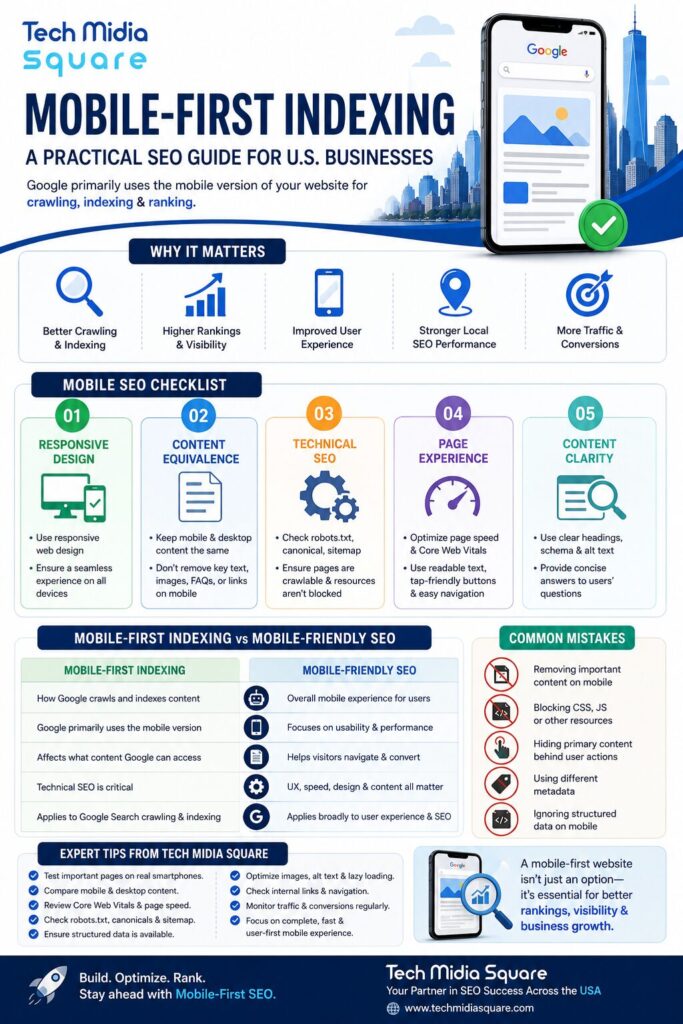
Mobile SEO Checklist for U.S. Businesses
1. Use Responsive Web Design
Responsive web design allows the same URL and HTML content to adapt to different screen sizes.
Your website should work naturally across:
- Smartphones
- Tablets
- Laptops
- Desktop computers
2. Keep Mobile and Desktop Content Equivalent
Don’t create a thin mobile version of an otherwise comprehensive desktop page.
Make sure important elements such as the following are available on mobile:
- Text
- Headings
- Images
- Internal links
- Product or service information
- FAQs
- Structured data
- Metadata
3. Check Technical SEO
Your mobile pages should be crawlable and render correctly.
Review the following technical SEO elements:
- Robots.txt
- Robots meta tags
- Canonical tags
- JavaScript rendering
- CSS and image accessibility
- Internal links
- XML sitemap
- HTTP status codes
4. Improve Page Experience
Mobile users don’t want to pinch, zoom, wait, or hunt for information.
Pay attention to:
- Page speed
- Core Web Vitals
- Readable typography
- Tap targets
- Navigation
- Intrusive pop-ups
- Image optimization
- Mobile forms
A good mobile page should make the next action obvious.
5. Make Content Easy for Search Engines to Understand
Mobile SEO and modern search visibility go beyond keywords.
Use clear headings, descriptive image alt text, logical internal links, concise answers, structured content, and relevant schema markup where appropriate.
This also creates stronger content signals for answer engines and AI-powered search experiences.
Mobile-First Indexing vs. Mobile-Friendly SEO
| Mobile-First Indexing | Mobile-Friendly SEO |
|---|---|
| Concerns how Google crawls and indexes content | Concerns the overall mobile experience |
| Google primarily uses the mobile version | Focuses on usability and performance |
| Affects what content Google can access | Helps visitors navigate and convert |
| Technical SEO is important | UX, speed, design, and content all matter |
| Applies to Google Search crawling and indexing | Applies broadly to user experience and SEO |
In practice, businesses shouldn’t treat these as separate projects. A technically accessible mobile website with poor usability still isn’t a strong search experience.
Common Mistakes to Avoid
Removing Important Content on Mobile
Shortening a page by removing valuable sections can make it harder for Google to understand the page.
Blocking Mobile Resources
Blocking CSS, JavaScript, images, or other important resources can prevent Google from properly rendering your page.
Hiding Primary Content Behind User Actions
Avoid loading primary content only after users click, swipe, or type. Search engines may not trigger these interactions in the same way a human visitor does.
Using Different Metadata
Your mobile and desktop versions should have equivalent titles and meta descriptions when separate versions are used.
Ignoring Structured Data
If structured data exists on your desktop version, make sure the relevant markup is also available on mobile.
Expert Tips From Tech Midia Square
Before launching or redesigning a website for the U.S. market, Tech Midia Square recommends this simple process:
- Test important pages on real smartphones.
- Compare mobile and desktop content.
- Inspect important URLs in Google Search Console.
- Review Core Web Vitals and page speed.
- Check robots.txt and robots meta directives.
- Verify canonical URLs.
- Test internal links and navigation.
- Confirm structured data is available where required.
- Check images, alt text, and lazy-loading behavior.
- Monitor organic traffic and conversions after major changes.
Don’t only test your homepage. Review your highest-value service pages, location pages, blog posts, product pages, and landing pages.
For example, if you’re targeting customers across New York, Chicago, San Francisco, Los Angeles, or Boston, each important location page should deliver a complete mobile experience rather than simply shrinking the desktop layout.
Frequently Asked Questions
Is mobile-first indexing still important?
Yes. Google uses mobile-first indexing across the web, so businesses should ensure their mobile pages contain the information they want Google to understand and index.
Does mobile-first indexing mean mobile rankings are separate?
No. Google has one index rather than a separate mobile index. Mobile-first indexing describes how Google primarily gathers and indexes page content.
Should mobile and desktop have the same content?
For important primary content, yes. Businesses should keep the mobile and desktop versions equivalent so the information Google uses for indexing isn’t reduced on mobile.
Can mobile SEO improve conversions?
Absolutely. A faster, easier-to-navigate mobile experience can reduce friction for visitors who are researching services, requesting quotes, calling a business, or completing forms.
Conclusion
Mobile-first indexing isn’t a trend businesses can choose to ignore. It’s part of how Google Search works.
The real opportunity is to think beyond simply making a website “mobile-friendly.” Your mobile site should be fast, crawlable, complete, easy to navigate, technically sound, and genuinely useful.
That’s where a comprehensive SEO strategy makes a difference.
Tech Midia Square helps U.S. businesses strengthen their technical SEO, local SEO, content strategy, website performance, and overall search visibility.
If your website receives impressions but isn’t generating enough organic traffic or leads, a mobile-first SEO audit can help identify what’s holding it back.
Ready to Improve Your Mobile SEO?
Contact Tech Midia Square for a customized SEO strategy built around your business goals and target U.S. market.